Steps7
- In Kownt X, open Settings.
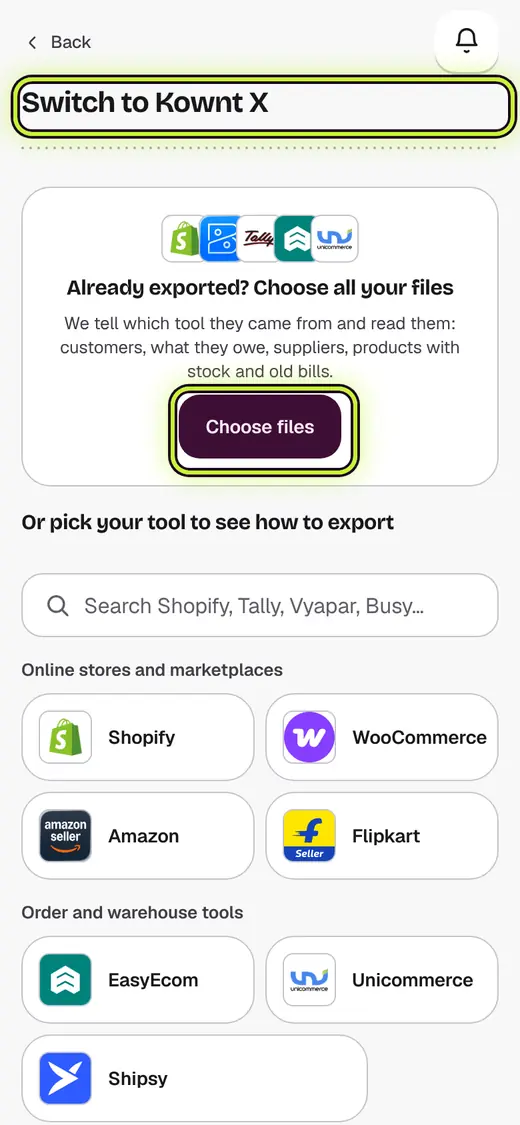
- Tap Switch to Kownt X.
- Pick the tool you are leaving. Follow its steps to export your files.
- Tap Choose files and pick every file at once.
- For a file we ask about, tap Match columns and check which column is which.
- Tap Check everything, then Try it first. Nothing is saved yet.
- Tap the button to move the rows in.
If it stops you
No headings found in this file: give the file a row of headings. Then choose it again.
Need fixing: those rows are skipped. Fix them in the sheet and choose the file again.
Good to know
- Shopify, Zoho, Tally, WooCommerce and Vyapar files are read as they are. Others are matched once.
- Nothing is added twice: people are matched by phone, then GSTIN, then name.
- You can take the whole move back for 7 days from Earlier moves.
- Anything sold or paid since then stays.
- It comes with Pro and Business. Any plan can upload one spreadsheet at a time.
Still stuck?
In the app, tap ? on the screen you are on and ask in your own words. Or email support@kowntx.com. A person replies in writing. Never send your PIN, code or card number.